# Fundamentals Lesson 9
**URL:** https://forum.codewithmosh.com/t/fundamentals-lesson-9/8101
**Category:** Django
**Created:** [October 23, 2021, 4:04pm UTC](https://forum.codewithmosh.com/t/fundamentals-lesson-9/8101 "2021-10-23T16:04:30Z")
**Posts on this page:** 14
**Page:** 1
### Author:  [@Daniel78852](https://forum.codewithmosh.com/u/Daniel78852)
#### Post date: [October 23, 2021, 4:04pm UTC](https://forum.codewithmosh.com/t/fundamentals-lesson-9/8101/1 "2021-10-23T16:04:30Z")
Hello. I have done as the video suggests. I can’t seem to get the “Hello World” out put I dont get any errors in the terminal, except when I run the server I get the following image.

Any help would be a blessing. Thanks.
---
### Author:  [@TaserFace20](https://forum.codewithmosh.com/u/TaserFace20)
#### Post date: [October 23, 2021, 4:25pm UTC](https://forum.codewithmosh.com/t/fundamentals-lesson-9/8101/2 "2021-10-23T16:25:03Z")
It seems like you need to go to “[http://127.0.0.1:8000/playground/hello](http://127.0.0.1:8000/playground/hello)” to get the Hello wold view.
---
### Author:  [@Daniel78852](https://forum.codewithmosh.com/u/Daniel78852)
#### Post date: [October 24, 2021, 4:04am UTC](https://forum.codewithmosh.com/t/fundamentals-lesson-9/8101/3 "2021-10-24T04:04:28Z")
> [@TaserFace20](#):
>
> [http://127.0.0.1:8000/playground/hello](http://127.0.0.1:8000/playground/hello)
Tried it and I received the same results or similar. Not sure where to go from here. I did some research but can’t find a similar situation. Thanks though
---
### Author:  [@TaserFace20](https://forum.codewithmosh.com/u/TaserFace20)
#### Post date: [October 24, 2021, 4:17am UTC](https://forum.codewithmosh.com/t/fundamentals-lesson-9/8101/4 "2021-10-24T04:17:05Z")
Can you post both urls.py and views.py? so we can have a look.
---
### Author:  [@Daniel78852](https://forum.codewithmosh.com/u/Daniel78852)
#### Post date: [October 27, 2021, 5:08am UTC](https://forum.codewithmosh.com/t/fundamentals-lesson-9/8101/5 "2021-10-27T05:08:59Z")
urls.py\>\>playground

urls.py storefront

---
### Author:  [@Daniel78852](https://forum.codewithmosh.com/u/Daniel78852)
#### Post date: [October 27, 2021, 5:10am UTC](https://forum.codewithmosh.com/t/fundamentals-lesson-9/8101/6 "2021-10-27T05:10:44Z")
views.py(Playground)

---
### Author:  [@Paul](https://forum.codewithmosh.com/u/Paul)
#### Post date: [October 27, 2021, 7:25am UTC](https://forum.codewithmosh.com/t/fundamentals-lesson-9/8101/7 "2021-10-27T07:25:45Z")
The problem is that in the main urls.py file you list this endpoint as `pg` and not not as `playground.` Try `127.0.0.1/pg/hello`.
---
### Author:  [@Daniel78852](https://forum.codewithmosh.com/u/Daniel78852)
#### Post date: [October 27, 2021, 7:50am UTC](https://forum.codewithmosh.com/t/fundamentals-lesson-9/8101/8 "2021-10-27T07:50:32Z")
Sorry bud, I should have mentioned this. I did change all of that as PG. I was having issues so I started the whole project again.
I can reach the hello world page now, but I keep getting this page when I run the server. So my issue is the landing page is now showing an error. I am unsure why.
Another issue is I can’t get the debug tool to appear. I’m going to re-start the project. as I really want to learn Django, and fine tune more of my HTML/CSS/JS skills.
Thanks bud, I’d appreciate any inpyut on how to solve the landing page issue.
---
### Author:  [@Paul](https://forum.codewithmosh.com/u/Paul)
#### Post date: [October 27, 2021, 8:12am UTC](https://forum.codewithmosh.com/t/fundamentals-lesson-9/8101/9 "2021-10-27T08:12:20Z")
So by landing page I assume you meen `127.0.0.1:8000`? Once you have set up a route in the main urls.py file that points to an endpoint eg` pg/`, then you will not get the Django landing page any more. If you want to have a landing page at `127.0.0.1/pg` then you need to explicitly add a `/` url pattern in addition to your `hello/` pattern in the `pg/urls.py` file otherwise you will get an error. Not sure if this is what you meant. If not, perhaps post the error page and your views and settings files again?
---
### Author:  [@Daniel78852](https://forum.codewithmosh.com/u/Daniel78852)
#### Post date: [October 27, 2021, 1:06pm UTC](https://forum.codewithmosh.com/t/fundamentals-lesson-9/8101/10 "2021-10-27T13:06:26Z")
I do appreciate the help. I’ll post each image again. I have gone back and changed it to playground to be more consistent.
views.py

PLAYGROUND URLS

Storefront urls.py
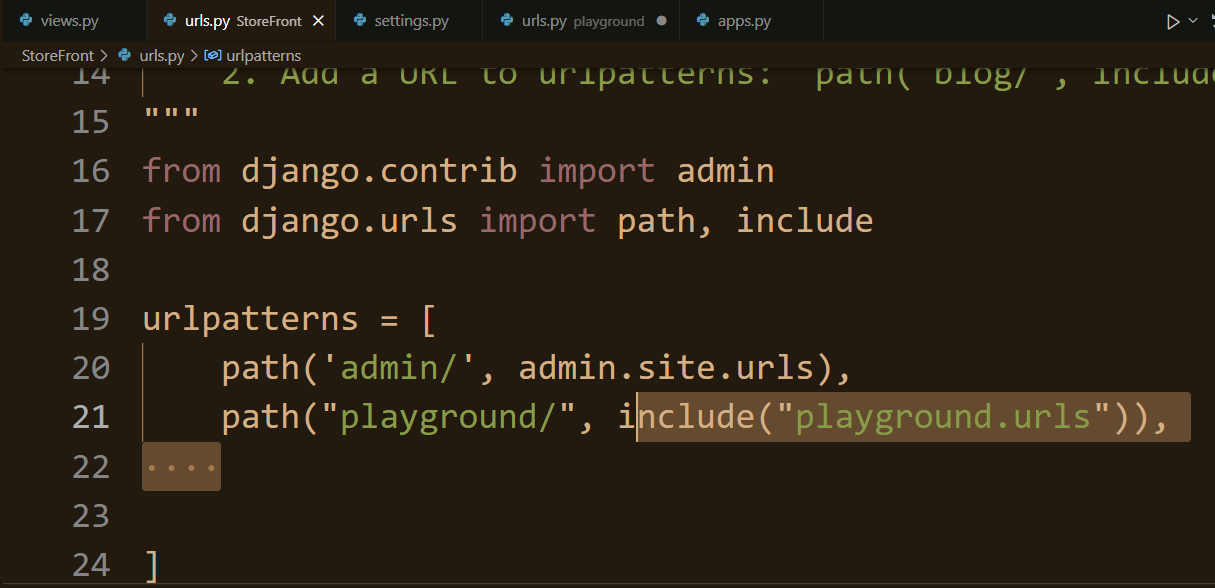
Storefront Settings

Yes, I am running the server to 127.0.0.1:8000 and I am expecting to see the Django landing page which is this image

Although when I complete the mappings I get this image instead.

Yes, once I type into the URL section /playground/hello
I am able to see my mapped out page and I see the message Hello World. .
I am trying to figure if the error page is normal, as in the video when Mosh runs the server he always gets the Django landing page.
Lastly in my terminal I get this message after the runserver command

Thanks for your insight.
---
### Author:  [@Paul](https://forum.codewithmosh.com/u/Paul)
#### Post date: [October 27, 2021, 4:00pm UTC](https://forum.codewithmosh.com/t/fundamentals-lesson-9/8101/11 "2021-10-27T16:00:58Z")
The error is normal, you will not get the landing page after you have added endpoints to the main urls.py url patterns. This is standard Django behaviour. You will now only have access the endpoints declared in this list, ie `playground/hello` and `admin` ,the latter of which is also provided by Django. The `404` error message you get at `127.0.0.1:8000` is because you do not have a `/` endpoint defined. If you want the landing page back, remove the added urls from the url patterns. Not that you want to do that since that is all you will then ever have. 😉
---
### Author:  [@Daniel78852](https://forum.codewithmosh.com/u/Daniel78852)
#### Post date: [October 28, 2021, 3:32am UTC](https://forum.codewithmosh.com/t/fundamentals-lesson-9/8101/12 "2021-10-28T03:32:53Z")
haha man thanks, I hav3e been on that wondering if I was following correctly. Now i’m working towrds the debugging tool bar. I have spent more time on debugging which has really made this course interesting and difficult. Thanks again bud. Now to figure out why I can’t see the tool bar.
---
### Author:  [@elleneia](https://forum.codewithmosh.com/u/elleneia)
#### Post date: [April 16, 2022, 3:11pm UTC](https://forum.codewithmosh.com/t/fundamentals-lesson-9/8101/13 "2022-04-16T15:11:38Z")
It would be nice if Mosh had mentioned that! I have been following along and “doing”, and got stuck trying to find where I made my mistake leaving a / without anywhere to go. HOURS spent on this lesson. I even went ALL THE WAY back to the beginning and started another project called “frontstore”, and got the same results!! Thank you, thank you for this note!! The good part? I have repeated and repeated and repeated these steps, listening to the teaching. I could probably teach Django to this point!! 😄 (Not!) I SO APPRECIATE Mosh’s Python and Django!!
---
### Author:  [@Jviice](https://forum.codewithmosh.com/u/Jviice)
#### Post date: [January 3, 2024, 12:11pm UTC](https://forum.codewithmosh.com/t/fundamentals-lesson-9/8101/14 "2024-01-03T12:11:52Z")
Im facing the same issue. I cant get the Django loading screen. Help 😭.
After I run the first ‘mange.py runserver’, I get the 404 type screen.